
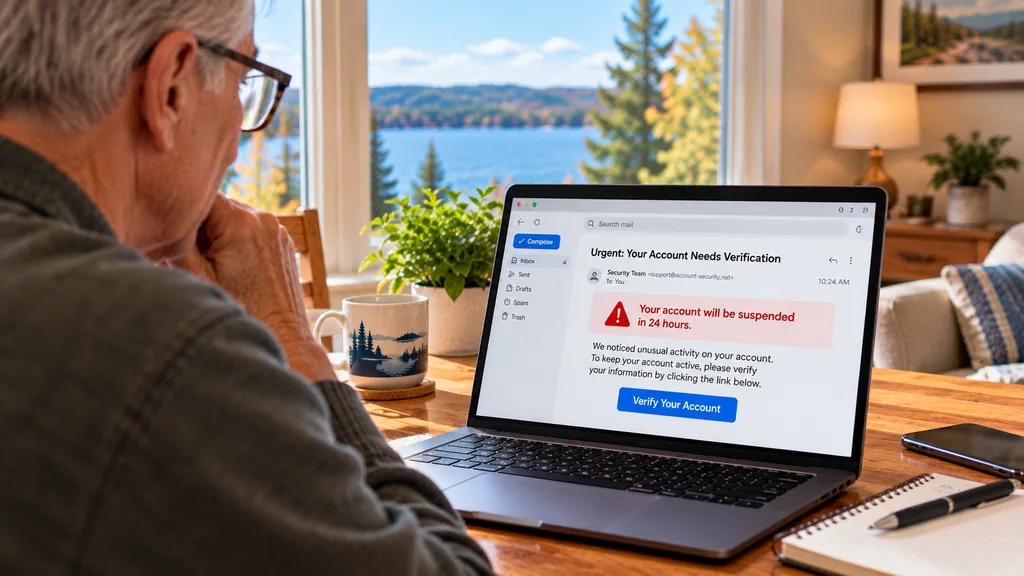
Learning to recognize scam emails and text messages is one of the most useful ways to protect yourself online. Scammers regularly send messages that look like they come from banks, delivery companies, government agencies, familiar businesses, and even people you know.
Some messages are easy to spot. Others look surprisingly convincing, using realistic logos, familiar names, and urgent language to encourage you to act before thinking.
The good news is that you don’t need advanced technical knowledge to recognize many common scams. Understanding a few warning signs and knowing how to verify suspicious messages can help you avoid costly mistakes.
Here are seven warning signs to watch for, along with practical steps to protect yourself.
1. The Message Creates a Sense of Urgency
One of the most common scam tactics is making you feel that something terrible will happen unless you act immediately.
You might receive an email or text claiming:
- Your bank account will be locked within 30 minutes.
- Your package cannot be delivered until you pay a fee.
- Your email account will be permanently deleted.
- You owe an overdue toll or parking payment.
- Someone has accessed your account and you must verify your identity immediately.
These messages are designed to create fear, confusion, or panic.
What to do: Don’t rush. If the message claims to be from an organization you use, open its official app or website yourself rather than following the link in the message.
Legitimate organizations may send time-sensitive notifications, so urgency alone doesn’t prove a message is fraudulent. It’s a reason to slow down and verify.
2. The Sender’s Email Address or Phone Number Looks Suspicious
Scammers often impersonate well-known companies by using familiar display names or email addresses that look almost correct.
For example, an email might display a familiar bank’s name while the actual sender address uses an unrelated domain.
Some scam messages also use addresses with extra letters, misspellings, or unusual endings.
What You Can Try
- Expand the sender details to view the actual email address.
- Look carefully at the domain after the @ symbol.
- Be cautious when the sender address doesn’t match the organization it claims to represent.
- Don’t assume a text message is legitimate simply because it appears in an existing conversation thread.
Important: A familiar-looking sender address or phone number does not guarantee that a message is genuine. Sender information can sometimes be spoofed.
The safest approach is to verify unexpected requests using a contact method you already trust.
3. You’re Asked to Click an Unexpected Link
Many scam emails and text messages contain links that lead to fake websites.
These websites may imitate real login pages, payment forms, or customer service portals.
The goal is often to collect information such as:
- Account usernames and passwords
- Credit card or banking information
- Personal identification details
- One-time verification codes
A common example is a text claiming that a delivery company needs you to update your address through a link.
Another example is an email saying your streaming subscription has expired and asking you to enter payment information.
What You Can Try
Instead of clicking the link, open the company’s official app or type its known website address directly into your browser.
On a computer, hovering over a link may reveal its destination. However, displayed link information can still be misleading, and hovering isn’t a reliable option on most phones.
Helpful tip: A website showing a padlock or HTTPS connection isn’t automatically trustworthy. Scam websites can also use encrypted connections.
4. The Message Requests Passwords or Verification Codes
Scammers sometimes pretend to be customer support representatives, bank employees, or account security teams.
They may ask you to share a password or a one-time verification code sent to your phone.
These codes are often used to confirm a login, authorize a transaction, or recover access to an account.
If someone obtains the code, they may be able to access your account even without knowing your password.
Warning Signs
- Someone unexpectedly asks you to read a verification code aloud.
- A caller says they need your password to fix a problem.
- A message asks you to send account recovery information.
- Someone pressures you to approve a login request you didn’t initiate.
What to do: Never share passwords or unexpected verification codes with someone who contacts you. If you receive a code you didn’t request, don’t use it or forward it.
If you’re concerned about your account, contact the organization through its official website, app, or a verified phone number.
5. The Message Contains Unexpected Attachments
Email attachments can be useful, but unexpected files deserve extra caution.
Scammers may send attachments disguised as invoices, receipts, shipping documents, tax forms, or account statements.
Some attachments contain malicious software, while others display instructions intended to trick you into visiting a fraudulent website or calling a fake support number.
What You Can Try
- Don’t open attachments you weren’t expecting from unfamiliar senders.
- Be cautious with unexpected invoices, even if they appear to come from a recognizable company.
- If the message appears to come from someone you know, verify the attachment with that person through another communication method.
- Keep your operating system, browser, and security software updated.
Important: Even common file formats, including PDFs and Office documents, can be used in scams. A familiar file extension alone doesn’t make an attachment safe.
6. The Message Offers Something That Seems Too Good to Be True
Not every scam relies on fear. Some try to attract attention with exciting news or unexpected rewards.
You might receive a message saying:
- You’ve won a prize from a contest you never entered.
- You’re entitled to a large refund.
- A stranger wants to send you money.
- You’ve been selected for a special investment opportunity.
- You can claim a free gift by paying a small shipping fee.
These messages may ask for personal information, payment details, or an upfront fee before you can receive the supposed reward.
What to do: Be skeptical of unexpected offers, particularly when you’re asked to pay money or provide sensitive information to claim something.
A genuine prize or refund should be verifiable independently through the organization involved.
7. Someone Asks You to Pay Using an Unusual Method
Scammers frequently request payments that are difficult to reverse or trace.
Common warning signs include demands for:
- Gift cards
- Cryptocurrency
- Wire transfers
- Payments through unfamiliar apps or websites
- Money sent urgently to someone claiming to be a relative in trouble
For example, someone might claim to be from a government agency and demand immediate payment using gift cards.
Or a message may appear to come from a family member who has lost their phone and urgently needs money.
What to do: Don’t send money based solely on an unexpected message. Contact the person or organization independently using information you already know.
If a supposed family member asks for urgent financial help, call their usual phone number or another trusted family contact to confirm the situation.
What Should You Do If You Receive a Suspicious Email or Text?
If something about a message feels wrong, you don’t need to respond immediately.
Use this simple checklist:
- Pause before acting. Scammers often rely on quick emotional reactions.
- Don’t click suspicious links. Visit the organization’s official website or app yourself.
- Don’t share sensitive information. Avoid providing passwords, verification codes, or payment details.
- Verify the request independently. Use a known phone number or trusted contact method.
- Report the message. Use the spam or phishing reporting feature in your email or messaging app.
- Delete or block the sender when appropriate. Once you’ve confirmed the message is unwanted, remove it from your inbox.
You can also report suspected fraud to the Federal Trade Commission at ReportFraud.ftc.gov.
For suspicious text messages, many U.S. mobile carriers accept forwarded spam texts at 7726 (SPAM).
What If You Already Clicked a Scam Link?
Clicking a suspicious link doesn’t automatically mean your information has been stolen. The next steps depend on what happened afterward.
If You Only Opened the Website
Close the page, avoid interacting with it further, and make sure your device and browser are up to date.
If the website downloaded a file, don’t open it. If you notice unusual behavior, consider running a security scan.
If You Entered a Password
Go directly to the legitimate service through its official website or app and change the affected password.
If you reused that password elsewhere, change it on those accounts too. Enable multifactor authentication where available and review recent account activity.
If You Shared Financial Information
Contact your bank or credit card company promptly using a trusted phone number. Explain what happened and ask what steps they recommend to protect your accounts.
If You Installed Software or Allowed Remote Access
Disconnect the affected computer from the internet if you suspect someone still has access, and seek help assessing the device before using it for sensitive activities.
If you used that computer to access financial or other important accounts during the incident, consider changing those passwords from a different trusted device.
Helpful tip: Keep a record of suspicious messages, transactions, or instructions you received if you need to report the incident.
If your computer is behaving strangely, my article about seven common computer problems and how to fix them includes additional troubleshooting tips.
How to Help a Family Member Avoid Online Scams
Scam messages can target anyone, regardless of age or experience with technology.
If you’re helping a parent, grandparent, or another family member, focus on building confidence rather than creating fear.
A few useful habits include:
- Encourage them to pause before responding to unexpected requests.
- Show them how to open trusted apps instead of following message links.
- Explain that caller IDs and sender names can be misleading.
- Help them save important organizations’ official contact information.
- Make it comfortable for them to ask questions about suspicious messages.
One of the most helpful things you can say is, “If you’re unsure, ask before clicking.”
If you’re helping someone become more comfortable with their phone, my guide on making a smartphone easier to use covers simpler screens, accessibility settings, and everyday phone features.
Get Help Understanding Online Safety
Technology should make everyday life easier, not leave you feeling worried about every email or text message.
At Lake Effect Works, I provide patient, one-on-one technology assistance in your home, including help understanding suspicious messages, reviewing everyday security settings, and learning safer online habits.
I can help explain common scam warning signs, review device settings, and show you practical ways to use email, smartphones, and computers with greater confidence.
Lake Effect Works serves Traverse City, Charlevoix, Elk Rapids, Bellaire, and surrounding Northern Michigan communities.
Explore My Technology Help Services
Frequently Asked Questions
How can I tell if an email is a scam?
Look for unexpected requests, urgent threats, suspicious links, unusual sender addresses, and requests for passwords or payment information. No single warning sign proves an email is fraudulent, so verify suspicious requests independently.
Can a scam text message look like it came from a real company?
Yes. Scammers can imitate familiar company names, branding, and sometimes sender information. Always verify unexpected requests through an official app, website, or trusted phone number.
Is it dangerous to open a scam email?
Simply viewing an email is generally less risky than clicking links, opening attachments, or providing information. However, keep your email software and device updated, and avoid interacting with suspicious content.
Should I reply to a suspicious message to ask if it’s real?
No. Replying can confirm that your email address or phone number is active. It’s safer to contact the organization independently using information you trust.
Can someone help me understand suspicious emails and texts?
Yes. Lake Effect Works offers in-home technology assistance in Northern Michigan, including guidance on recognizing common scams and using everyday devices more safely. Visit my Get Help page to discuss what you’d like help with.